
One wallet for people. One API for programs.
Most people will only ever see the desktop wallet: a window with a balance, a Send button and a Start mining button. Under it is the same node and the same commands that a server or an exchange uses. Pick the one that fits what you are doing.
The desktop wallet
The wallet is a small program that runs entirely on your computer and shows itself in its own window. Keys are made there and never leave; proofs are built there; what nodes tell it is checked there.
- Wallet. Any number of wallets, each with its own 24 words and password. Balance, private payments with an optional memo, a short address and a QR code to be paid with.
- History. Every payment, with search and filters, a Proof button to prove a payment to someone, and a link that opens its transaction or block on the explorer.
- Swap. Buy or sell GNR for bitcoin, wallet to wallet, with no exchange and no custody. Offers can follow the market price by themselves, within a limit you set.
- Mining. Choose a graphics card or the processor and press Start. It shows your share of the network and what it earns.
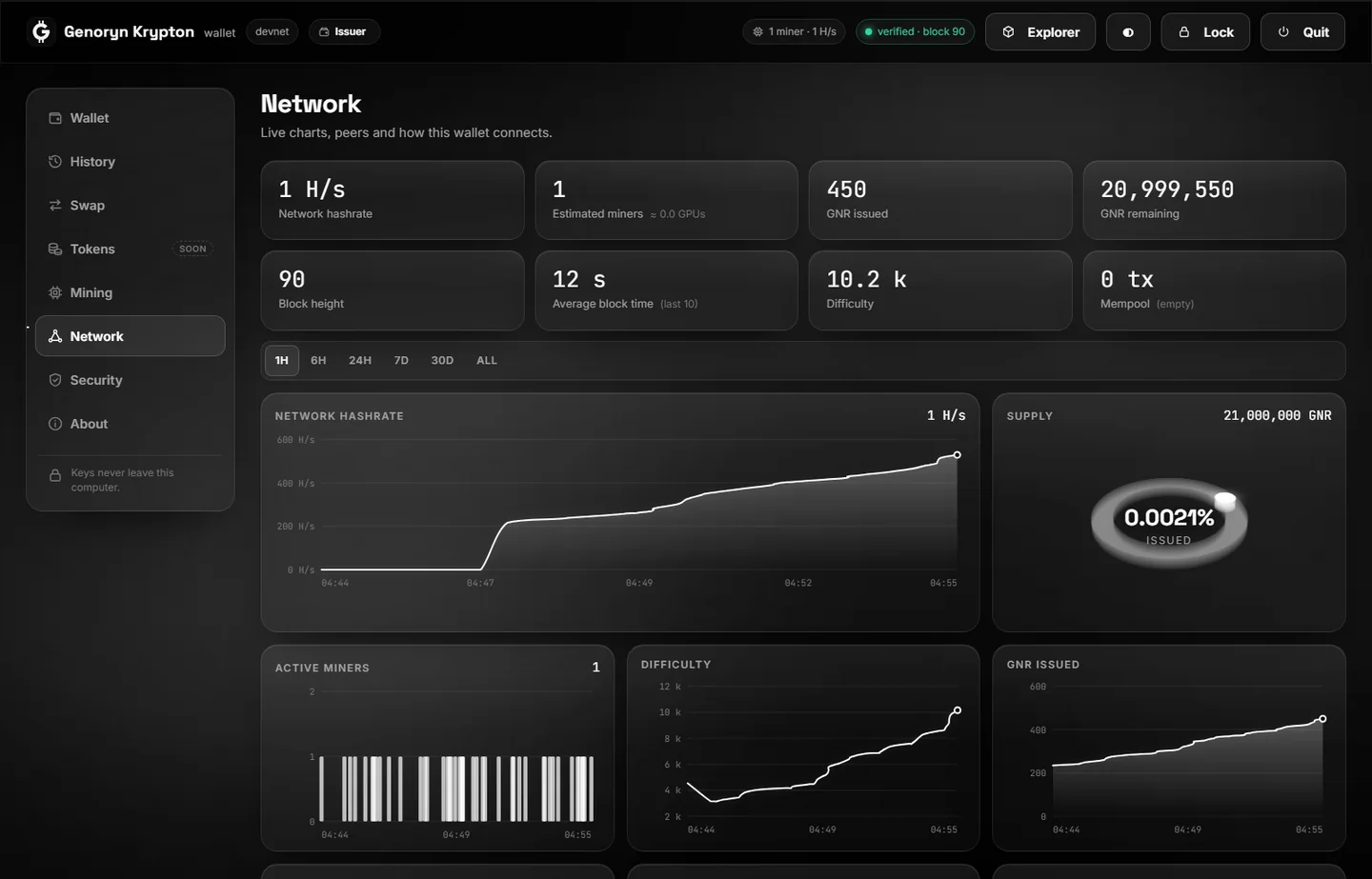
- Network. Live charts, peers, and the switch between light mode and your own full node.
- Console. Ask the chain and the wallet by command. More on it below.
- Security and About. Passwords, locks, the recovery phrase, updates.
Dark and light themes, and updates that are checked against the project's post-quantum signature before they install.
The console
The wallet has a console, as Bitcoin's has: a line to type commands on, with their answers above it. Start typing and it offers the commands that match; Tab completes one, the arrow keys bring back earlier lines, and help lists them all.
> getblockcount
21763

> getblockhash 21000
"7989d2cf54aadd42b81bfd7d01f89d9bf5633d536fd12be9e28224cca2122902"

> getsupply
{
  "halving_interval": 2100000,
  "height": 21763,
  "issued_gnr": "108815.00000000",
  "max_supply": 2100000000000000,
  "next_halving_height": 2100001,
  "subsidy": 500000000
}

> validateaddress gnrs1…
{ "valid": true, "network": "mainnet", "form": "short" }
Blockchain
getblockchaininfo getblockcount getbestblockhash getblockhash getblock getblockheader getrecentblocks getdifficulty getsupply
Transactions and addresses
gettransaction getmempoolinfo getnullifier estimatefee validateaddress resolveaddress getaddressinfo
Mining and network
getnetworkhashps getshares getminerinfo getmininginfo getpeerinfo getconnectioncount getnetworkinfo getmarketinfo
This wallet
getwalletinfo getbalance getaddress listtransactions listwallets getversion help clear
The console only reads. No command can send GNR, show a recovery phrase or a key, or change a setting. That is deliberate. In other wallets, people have been talked into pasting a command that handed over their coins; here there is no such command. Nobody ever needs you to type anything into the console to "verify" or "repair" a wallet.
Questions about the chain go to the node your wallet uses, your own if you run one. A transaction's amount and parties stay hidden there as everywhere.
The command line
krypton-wallet-cli is the same wallet without a window. It verifies what a node tells it exactly as the desktop wallet does.
# create a wallet; the 24 words are shown once
krypton-wallet-cli new
# a verified light sync, then the balance
krypton-wallet-cli --node https://genoryn.io balance
# pay privately, with a memo only the recipient can read
krypton-wallet-cli --node https://genoryn.io send gnrs1... 2.5 --memo "invoice 42"
kryptond is the full node, and krypton-miner the miner. Each explains itself with --help. See the full-node guide and Mining.
The node's API
Every node answers on this computer, port 30334, in three ways. None of them can spend anything: a node holds no keys.
REST
Plain addresses that answer JSON: /v1/info, /v1/block/21000, /v1/tx/…, /v1/supply, /v1/fee, and more for wallets, miners and the swap board.
JSON-RPC 2.0
At /rpc, with the method names people know from Bitcoin: getblockcount, getblock, gettransaction, sendrawtransaction, getblocktemplate.
WebSocket
At /v1/ws: a message for every new block and every new transaction, as they arrive.
curl -s http://127.0.0.1:30334/v1/info
curl -s http://127.0.0.1:30334/rpc -H 'content-type: application/json' \
     -d '{"jsonrpc":"2.0","id":1,"method":"getblockcount","params":[]}'
The public node at genoryn.io answers the same questions, with limits per visitor. There are SDKs for TypeScript and JavaScript, for Rust and for C. The whole reference, with what an exchange needs to list GNR, is in the documentation.